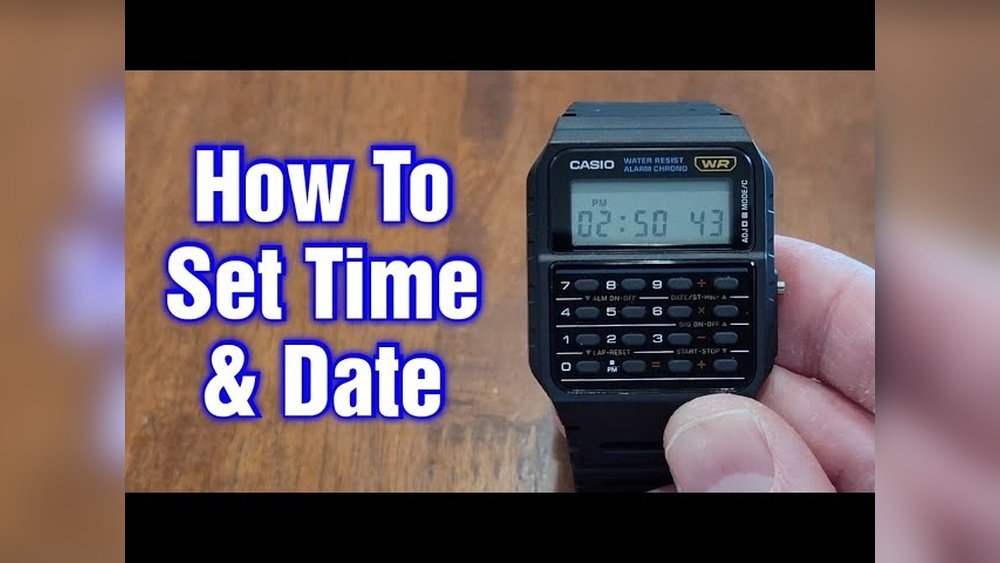
If you own a Casio calculator watch, you know it’s more than just a timepiece—it’s a handy gadget on your wrist. But when the time needs adjusting, it can feel confusing.
Don’t worry, you’re not alone. Setting the time on your Casio calculator watch is easier than you think, and once you know the steps, you’ll never struggle with it again. Keep reading, and you’ll learn exactly how to set your watch quickly and correctly.
This simple skill will save you time and keep your watch running perfectly every day.
Casio Calculator Watch Features
The Casio calculator watch has many useful features. It shows the time, date, and day. The calculator function is easy to use for quick math. Buttons are small but clear.
Key functions include time setting, alarm, stopwatch, and calculator. Use the mode button to switch between functions. The adjust button helps change settings. Number buttons work for both calculator and time input.
| Button | Function |
|---|---|
| Mode | Change between time, alarm, stopwatch, calculator |
| Adjust | Start time setting or change current setting |
| Number Keys (0-9) | Input numbers for calculator and time |
| Start/Stop | Start or stop stopwatch or alarm |
| Reset | Reset stopwatch or cancel changes |

Credit: www.scribd.com
Preparing To Set The Time
First, find the Mode button on your Casio calculator watch. It is usually on the bottom left side. Pressing this button will change the watch’s mode.
Press the Mode button several times until the display shows the time or a blinking number. This means you have entered the time setting mode. The blinking number shows what you can change, like hours or minutes.
Once in time setting mode, use the other buttons to adjust the numbers. The watch may have buttons labeled Adjust or Set. Use these to increase or decrease the time.
Adjusting Hours And Minutes
Start by pressing the mode button on your Casio calculator watch. Keep pressing until the time setting mode shows. The hour digits will begin to blink. Use the adjust button to change the hour. Press it once for each hour you want to move forward. Stop when the correct hour appears. Be careful with AM and PM if your watch uses 12-hour format.
After setting the hour, press the mode button again. The minutes will start blinking. Use the adjust button to set the minutes. Press it multiple times until you reach the right minute. Once done, press the mode button to exit the setting mode. Your watch will now show the correct time.
Setting Additional Time Options
Press the Mode button until the time flashes. Use the Adjust button to switch between AM/PM and 24-hour format. This changes how the watch shows time. For AM/PM, look for “A” or “P” on the display. The 24-hour format shows time from 00 to 23 hours.
To set the date and day, press the Mode button again until the date flashes. Use the Adjust button to change the day and date. Press the Mode button to move between day, month, and year. Confirm the settings by pressing the Adjust button once more.
Saving Your Settings
Press the Mode button to exit the time setting mode. This saves your changes automatically.
Check if the time is correct on the display. The watch will now run with the new settings.
If the time looks wrong, repeat the steps to set it again. Make sure to press the Mode button last to save.
Troubleshooting Common Issues
Watch not responding usually means the buttons might be stuck or dirty. Try pressing each button firmly several times. Clean the watch gently with a soft cloth. Dirt or moisture can stop it from working.
Time resets frequently often happen if the battery is weak or old. Replace the battery with a new one to fix this. Another cause could be a loose battery connection inside the watch. Press the battery gently to ensure it fits well.
Sometimes, excessive button pressing can confuse the watch’s settings. Avoid pressing many buttons at once. Let the watch rest for a minute before trying again.
Maintaining Your Casio Calculator Watch
To keep your Casio calculator watch working well, take care of the battery. Replace the battery as soon as the display gets dim or the calculator buttons stop working. Avoid leaving the watch in very hot or very cold places, as this can shorten battery life.
Regular cleaning helps too. Use a soft, dry cloth to wipe the watch gently. Avoid water or cleaning sprays, which can damage the watch. Clean the buttons carefully to remove dirt. This keeps the watch looking nice and working smoothly.

Credit: www.reddit.com

Credit: www.youtube.com
Frequently Asked Questions
How Do I Set The Time On A Casio Calculator Watch?
Press and hold the “Mode” button until the seconds flash. Use the “Adjust” button to change values. Press “Mode” to cycle through hours, minutes, and seconds. Adjust each using the calculator keys. Press “Mode” again to save the settings.
Can I Set The Date On My Casio Calculator Watch?
Yes, enter time-setting mode by holding the “Mode” button. Cycle to the date using the “Mode” button. Adjust day, month, and year using calculator keys. Press “Mode” to save your settings after adjusting.
What Buttons Control Time Adjustment On Casio Watches?
Use the “Mode” button to enter time-setting mode. Adjust values using the calculator keys or “Adjust” button. Cycle through hours, minutes, and seconds with “Mode. ” Press “Mode” again to confirm and exit.
How Long Does It Take To Set Time On Casio Watch?
Setting time typically takes under two minutes. The process involves entering time-setting mode, adjusting values, and saving. Familiarity with buttons speeds up the process significantly.
Conclusion
Setting the time on your Casio calculator watch is quick and simple. Follow the steps carefully to ensure accuracy. Take your time with each button press for the best result. Soon, your watch will show the correct time without any trouble.
Enjoy the convenience of a perfectly set calculator watch every day. Keep this guide handy for future reference. This way, you stay on time and organized with ease.