Is your Casio G-Shock acting up or stuck on the wrong time? You’re not alone, and the good news is fixing it is easier than you might think.
Resetting your G-Shock can solve many common problems, from frozen screens to incorrect settings. In this guide, you’ll learn simple steps to reset your watch quickly and get it working perfectly again. Keep reading—your G-Shock will thank you.

Credit: www.youtube.com
Types Of Casio G Shock Resets
Soft Reset clears minor errors without losing saved settings. It helps if the watch acts slow or shows wrong time. Hold down the adjust button for a few seconds to start this reset.
Hard Reset restores the watch to basic working mode. It removes temporary glitches but keeps your personal data. Press a combination of buttons as per your model to perform this reset.
Factory Reset erases all settings and returns the watch to original factory state. Use it only if other resets don’t work. This reset deletes alarms, time zones, and other custom settings.
Preparing Your Watch For Reset
First, check the battery status of your Casio G Shock. A low battery can cause reset issues. Replace the battery if it looks weak or dead. Next, backup important settings like alarms, time zones, and stopwatch records. These will be lost during the reset. Write them down or take a photo for easy reference.
Find the buttons on your watch before starting the reset. Usually, there are four buttons around the watch face: Adjust, Mode, Start/Stop, and Split/Reset. Knowing their positions helps you follow reset steps smoothly.
Steps For Soft Reset
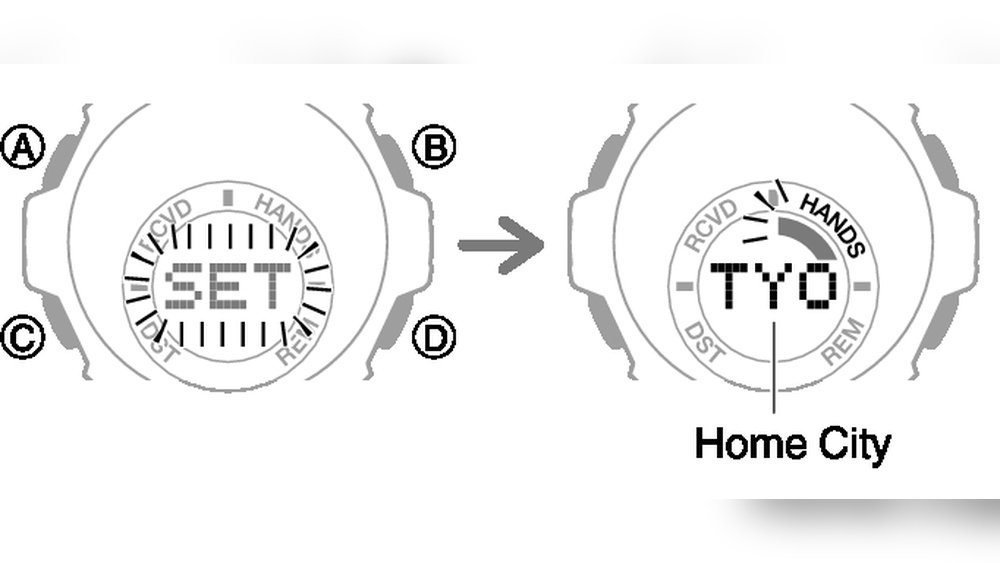
To start a soft reset, press the reset combination on your Casio G Shock. Hold down the adjust button for about 3 seconds until the display starts flashing. Then, press the mode button to cycle through the settings. Finally, press the reset or light button to confirm the reset.
Check the watch display to verify the reset worked. The time and date should blink or show default values. If not, repeat the reset steps carefully.
After resetting, you need to reconfigure basic settings. Set the correct time, date, and time zone. Use the mode button to move through each option. Press adjust to save your changes. This ensures your watch works correctly after the reset.
Performing A Hard Reset
A hard reset is useful when your Casio G Shock watch freezes or stops working properly. It helps to clear errors and restore settings to default.
Common signs for a hard reset include:
- Buttons don’t respond
- Time and date are incorrect
- Watch shows strange symbols
- Functions don’t work as expected
To reset your watch:
- Press and hold the Adjust button for 3 seconds
- Watch will beep or flash
- Release the button
- Press Mode to cycle through settings
- Use Start/Stop or Split/Reset to adjust values
- Press Adjust again to save and exit
If the watch still has issues, try removing the battery for a minute.
Check the manual for model-specific reset steps.
Executing A Factory Reset
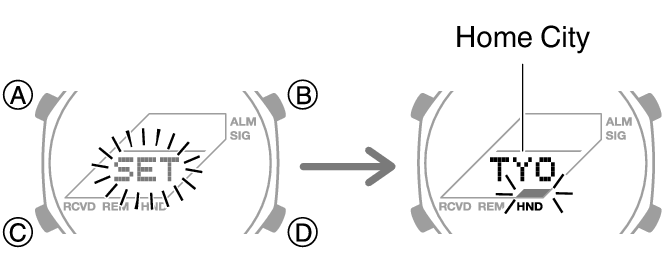
To reset a Casio G Shock watch, press and hold the Adjust button until the numbers flash. This means the watch is ready to reset. Use the Mode button to scroll through settings. Press the Adjust button again to return to normal. The watch now has original factory settings.
After resetting, you must set the time, date, and alarms again. Check if the watch is showing the right time zone. Adjust any other features you want to use, like the stopwatch or timer.
Make sure the watch battery is strong before resetting. Resetting will erase all your custom settings. Do not reset if you want to keep your saved data. Keep the watch dry and clean while resetting to avoid damage.
Tips To Avoid Resetting Frequently
Keep your Casio G Shock working well with regular maintenance. Clean it often to avoid dirt and dust build-up. Check the buttons and screen for any damage. This helps the watch last longer and prevents frequent resets.
Change the battery at the right time. A low battery can cause the watch to reset or stop. Replace the battery as soon as you notice the watch losing power or time. Use the correct battery type for your model.
Use the watch carefully. Avoid dropping it or exposing it to strong shocks. Keep it away from strong magnets and extreme temperatures. Follow the instructions for setting and using the watch. Good usage habits help avoid problems and keep your watch working well.
When To Seek Professional Help
Signs reset won’t work include the watch not responding to button presses or the display showing odd symbols. If the watch does not reset after multiple tries, it may have a deeper issue. Water damage, battery problems, or internal faults can cause this.
Authorized service centers have trained technicians and original parts. They can fix complex issues safely. Using these centers helps keep the warranty valid and protects the watch from further damage.
| Warranty Type | Repair Options | Notes |
|---|---|---|
| Manufacturer Warranty | Free repair or replacement | Valid for a limited time after purchase |
| Out of Warranty | Paid repair service | Costs depend on the issue and parts needed |
| Third-Party Repair | Possible repair, no warranty | Risk of non-original parts and voided warranty |
Credit: support.casio.com

Credit: www.youtube.com
Frequently Asked Questions
How Do I Reset My Casio G Shock Watch?
To reset a Casio G Shock, hold down the Adjust button for 3-5 seconds. Wait until the watch beeps or resets to default settings. This restores factory settings and clears any customizations or errors.
Can I Reset Casio G Shock Without Losing Data?
No, resetting a Casio G Shock usually erases all settings. Backup important data manually before resetting. Use reset only when necessary to fix issues or restore defaults.
Why Won’t My Casio G Shock Reset Properly?
If your Casio G Shock won’t reset, check the battery level. A low or dead battery can prevent reset. Replace the battery and try resetting again.
How Often Should I Reset My Casio G Shock Watch?
Resetting is only needed when the watch malfunctions or settings get corrupted. Regular resets are unnecessary and can erase your custom settings.
Conclusion
Resetting your Casio G Shock is simple and quick. Follow the steps carefully for best results. This helps fix most common watch issues. Keep your watch working like new. Practice these steps whenever needed. Enjoy your G Shock without any worry.
Take control of your watch settings today. Easy fixes save time and frustration. Your watch will stay reliable and accurate. Try resetting whenever your watch acts up.