Changing the battery in your Casio watch is simple. But after you do it, the watch may need to be set again. Sometimes, the watch will not work right without a reset. This guide will help you set your Casio watch after a battery change. We will explain each step clearly and simply.
Why Do You Need to Set Your Casio Watch?
When you replace the battery, the watch may lose its settings. The time, date, and other functions may be wrong. Some Casio watches need a reset to start working again. This reset is called the “AC reset” or “All Clear reset.”
Without this reset, the watch might show wrong time or stop working. So, setting it correctly is very important.

Credit: www.youtube.com
Tools You Will Need
- New battery for your Casio watch
- Small screwdriver to open the watch back
- Plastic tweezers or a small stick (optional)
- Soft cloth to protect the watch face
Step 1: Change the Battery
If you have not changed the battery yet, follow these steps:
- Place the watch face down on a soft cloth.
- Use the screwdriver to open the back cover carefully.
- Remove the old battery gently with plastic tweezers or a small stick.
- Insert the new battery in the same place and direction.
- Close the back cover tightly.
Now your watch has a new battery. But it may not work properly yet.
Step 2: Perform the AC Reset
After changing the battery, many Casio watches need an AC reset. This reset clears old settings and helps the watch start fresh.
Here is how you do the AC reset:
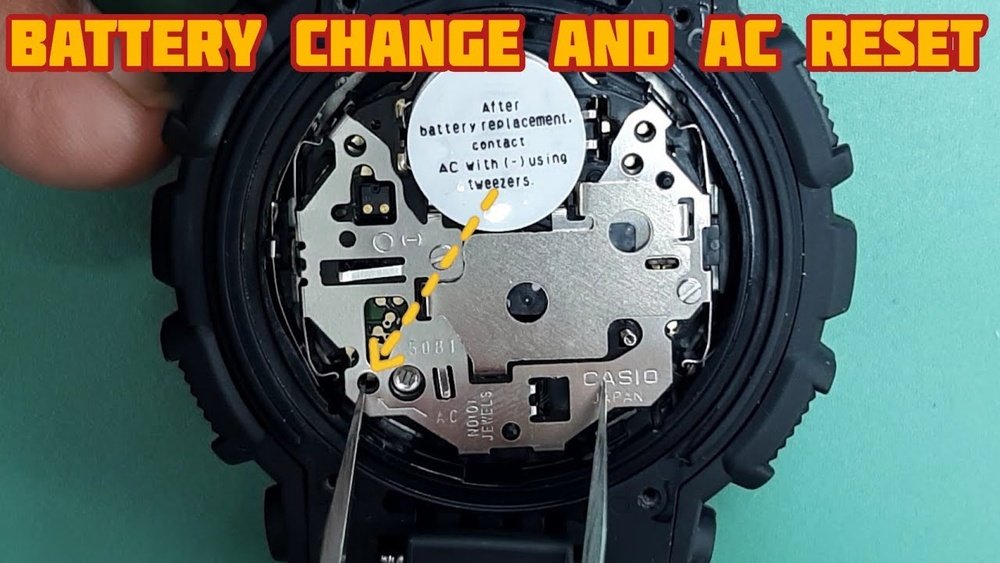
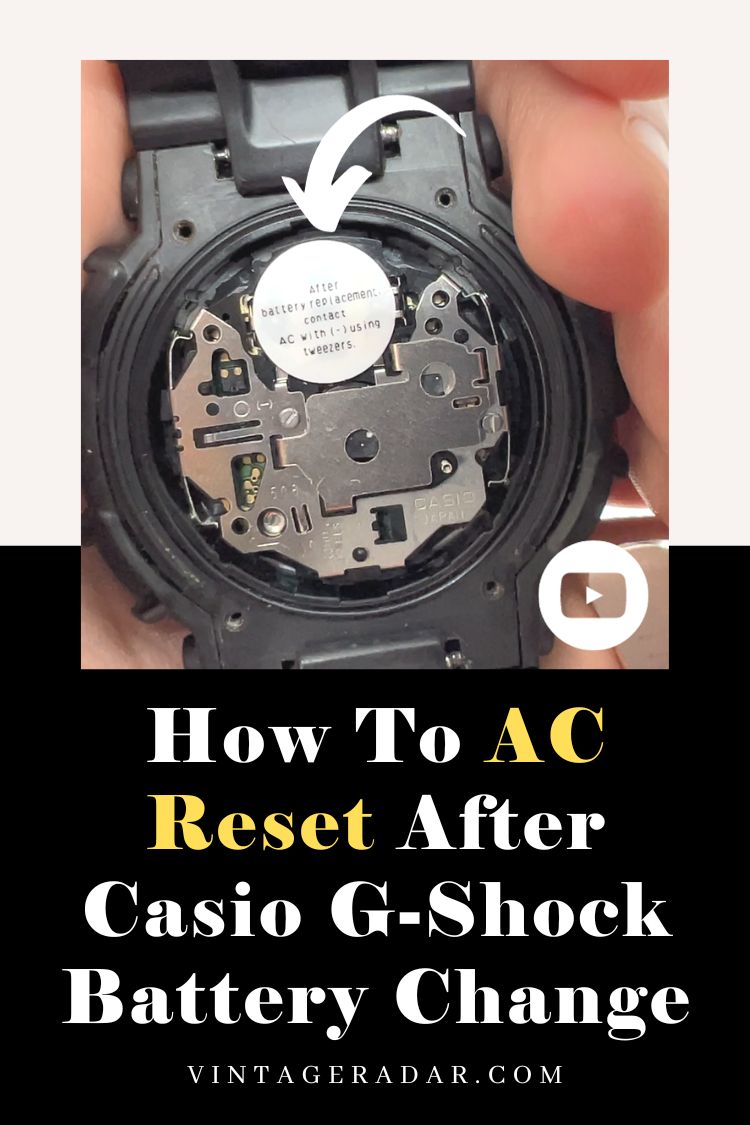
- Find the small “AC” contact point inside the watch near the battery. It is usually a small metal dot or circle.
- Use a small metal tool (like the tip of a paperclip) to touch the “AC” contact point.
- At the same time, press and hold the “Adjust” button on the watch (usually the top left button).
- Hold both for about 3-5 seconds until the watch display resets or shows 12:00.
- Release the button and remove the tool from the AC contact.
This step resets the watch’s memory after the battery change.
Step 3: Set the Time and Date
After the reset, the time will be wrong. You need to set the time and date again. Follow these steps:
- Press the “Mode” button (usually bottom left) until the time starts flashing.
- Press the “Adjust” button (top left) to enter the setting mode.
- Use the “Start/Stop” button (bottom right) to change the number (hours or minutes).
- Press the “Mode” button to move to the next setting (minutes, year, month, day).
- Repeat the process until all settings are correct.
- Press the “Adjust” button to save all changes and exit.
Your Casio watch now shows the correct time and date.
Step 4: Check Other Functions
Some Casio watches have other features like alarms, stopwatch, or world time. After a battery change, these may need to be reset too.
Use the “Mode” button to check each function. Set or reset them as needed. This will make sure your watch works well.
Tips to Remember
- Always use the right battery for your Casio watch model.
- Be gentle when opening the watch back to avoid damage.
- If your watch has a screw back, use a proper tool to open it.
- When touching the AC contact, do not touch other parts inside the watch.
- If your watch does not reset, try pressing the buttons in different orders.
Example: How to Reset a Casio G-Shock Watch
Many people have Casio G-Shock watches. Here is a quick way to reset them after battery change:
- After changing the battery, press and hold the “Menu” button (bottom left) until the menu appears.
- Use the “Start/Stop” button to scroll down to “RESET.”
- Press the “Adjust” button to select reset.
- The watch will reset and return to normal mode.
This method works for many G-Shock models.
Common Problems and Solutions
| Problem | Possible Cause | Solution |
|---|---|---|
| Watch does not turn on | Battery not inserted correctly | Open back and check battery position |
| Time does not set | Not in setting mode | Press “Adjust” button to enter setting mode |
| Watch resets after setting | Battery is weak or old | Replace battery with new one |
| Buttons do not work | Watch needs AC reset | Perform AC reset as explained above |
Credit: vintageradar.com
Final Thoughts
Setting your Casio watch after a battery change is easy. It only takes a few simple steps. First, change the battery carefully. Then perform the AC reset if needed. Finally, set the time and date correctly.
Remember to check other features and reset them if needed. Following these steps will keep your Casio watch working well for many years.
Take your time and be patient. Your watch will soon tell the correct time again.
Frequently Asked Questions
How To Reset Casio Watch After Battery Change?
To reset a Casio watch after battery change, press and hold the reset button (usually marked “AC”) for a few seconds. The watch will reset, restoring normal functions. Check your model’s manual for exact button location. This process recalibrates the watch after battery replacement.
Do I Need To Reset Anything After Replacing The Battery?
After replacing the battery, perform an AC reset on your Casio watch by holding the designated button. Then, set the time and other functions manually. This ensures the watch works correctly and all features reset properly. No further resets are usually needed.
How Do I Set The Time On My Casio Watch With 4 Buttons?
Press and hold the bottom left button until the time flashes. Use the top right and bottom right buttons to adjust hours and minutes. Press the bottom left button again to save the settings. Your Casio watch time is now set.
How To Restart Watch After Battery Change?
After changing the battery, press and hold the reset (AC) button for a few seconds. The watch will restart and reset. Then, set the time and date as needed.