If your Casio watch band is too big, you can make it smaller. The best way is to remove some links from the band. This guide will show you how to remove links from a Casio metal watch band step-by-step. It is easy and you can do it at home.
What You Need to Remove Links
- Small flathead screwdriver or a pin pusher tool
- Small hammer (optional)
- Soft cloth or mouse pad to protect the watch and surface
- Tweezers or small pliers
- A well-lit and clean workspace
Using these tools will help you remove links safely without damaging your watch.
Step 1: Prepare Your Workspace
Find a flat and clean surface to work on. Put a soft cloth or a mouse pad on the table. This will protect your watch and stop small parts from rolling away.
Place your watch face down on the cloth. Make sure the clasp is open to give you more space to work.
Step 2: Find the Link Pins
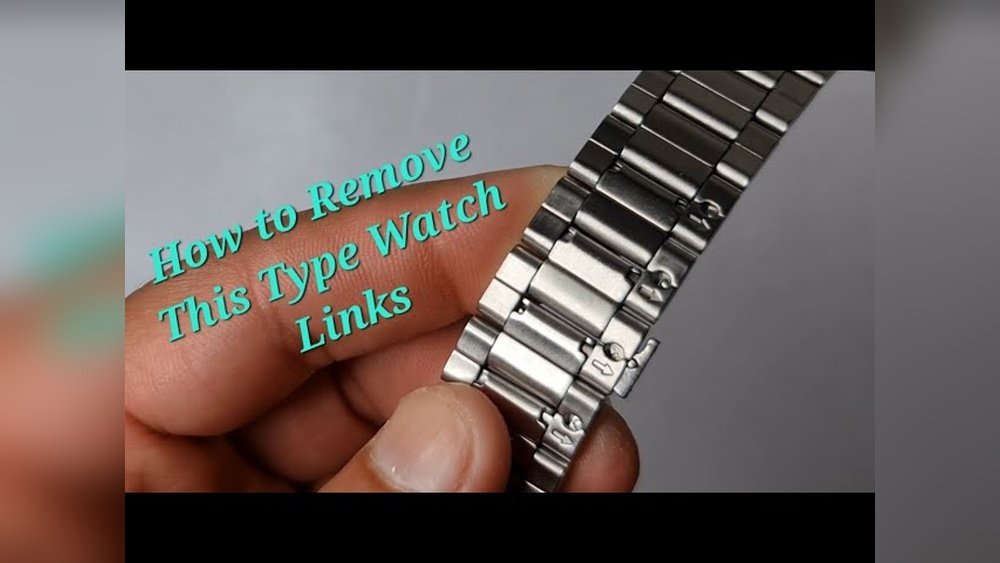
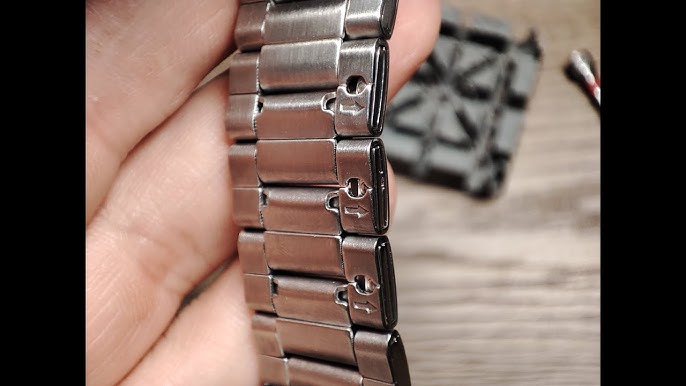
Look closely at the metal band. You will see small arrows on the inside of some links. These arrows show which way to push the pins out.
The pins hold the links together. You need to push these pins out to remove the links.
Step 3: Push Out the Pins
Take your small screwdriver or pin pusher tool. Put it on the pin where the arrow points.
Gently push the pin in the direction of the arrow. You can use a small hammer to tap the tool if the pin is tight. Tap lightly and carefully to avoid damage.
Once the pin starts to come out, use your tweezers or pliers to pull it completely out.
Step 4: Remove the Link
After removing the pin, the link will be free. Take out the link you want to remove.
Repeat the process if you want to remove more links. Remember, remove links evenly on both sides of the clasp. This will keep your watch balanced and comfortable.
Step 5: Reattach the Band
When you have removed the right number of links, it is time to put the band back together.
Line up the ends of the band where you took out the links. Push the pin back into the holes in the opposite direction of the arrow.
Use the small hammer or screwdriver to tap the pin until it is flush with the band. Make sure the pin is tight and secure.
Step 6: Check the Fit
Try on your watch to see how it fits. If it is still too loose or tight, repeat the steps to remove or add links.
Adjust slowly and carefully until the watch feels comfortable on your wrist.

Credit: www.reddit.com
Tips for Removing Links from Casio Watch Bands
- Always remove links from both sides of the clasp.
- Keep the pins you remove in a safe place. You might need them later.
- Work in good light to see the pins clearly.
- Do not force the pins out. If they don’t move, try a gentle tap.
- If unsure, ask a watch repair shop for help.
Types of Casio Watch Bands
Casio watches have different bands. Some have metal links like we described. Others may have resin or rubber straps that do not need link removal.
Make sure your watch band is a metal link type before starting. This guide is for metal bracelets only.
Credit: www.youtube.com
Why Remove Links from Your Watch Band?
A watch that fits well is more comfortable. If your band is too loose, the watch may slide around. This can be annoying or cause damage.
Removing links helps the watch fit snugly on your wrist. It also looks better and feels better.
What If Your Casio Watch Band Does Not Have Holes?
Some Casio bands have pins hidden inside the links. These do not have visible holes on the side.
For these, use a small flathead screwdriver to gently lift the edge of the link. You may need to use a little force but be careful.
Once the flap is lifted, you can slide the link out or remove the pin inside.
Always take your time and avoid bending or breaking the metal.
When to Seek Professional Help
If you feel unsure or your watch band is very tight, visit a watch repair shop. Professionals have the right tools and skills.
They can remove or add links safely without damaging your watch. This is a good option if your band is expensive or has special parts.
Summary: Easy Steps to Remove Links from Casio Watch Band
| Step | Action |
|---|---|
| 1 | Prepare a soft workspace and open the clasp |
| 2 | Find arrows on inside of links to locate pins |
| 3 | Push pins out with screwdriver or pin pusher |
| 4 | Remove the links you want to take out |
| 5 | Reattach the band by pushing pins back in place |
| 6 | Try on the watch and check the fit |
Removing links from your Casio watch band is easy. Just follow these steps carefully. With the right tools and a little patience, you can adjust your watch to fit you perfectly.
Frequently Asked Questions
How Do I Remove A Link From A Casio Watch Strap?
Use a small pin pusher or spring bar tool to push the pin out from the link’s side. Pull the pin to remove the link. Repeat as needed for desired length. Reconnect the band by reinserting the pin securely. Handle carefully to avoid damage.
How To Shorten The Band On A Casio Watch?
Use a small flathead screwdriver or pin pusher to remove the band pins carefully. Slide out links until desired length. Reinsert pins securely.
What Tool Is Used To Remove Links From Casio Watch?
Use a spring bar tool or a thin, pointed pin pusher to remove links from a Casio watch band safely.
How To Make Casio Strap Metal Shorter?
Use a small tool to lift the clasp flap on the Casio metal strap. Slide the clasp to shorten the band. Push the flap down to lock it securely. Remove links with a pin pusher if further adjustment is needed.