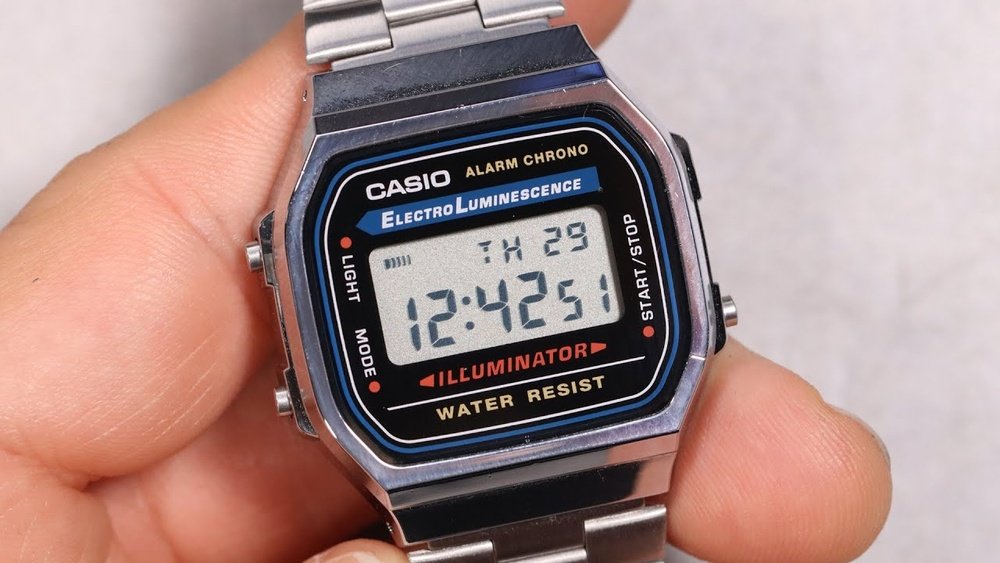
If you’ve just got your Casio A168 watch, you might be wondering how to set the time and date quickly and correctly. Getting it right is easier than you think, and once you do, your watch will keep you perfectly on track every day.
In this guide, you’ll find simple, step-by-step instructions that anyone can follow—no confusing tech talk or complicated steps. Keep reading, and you’ll have your Casio A168 set up in no time, ready to show off its classic style and reliable function.

Credit: www.youtube.com
Casio A168 Features
The Casio A168 watch has many useful features. It shows the time in both 12-hour and 24-hour formats. The watch has a digital display that is easy to read. It also includes a calendar that shows the day and date. The watch has a built-in alarm to help remind you of important times. A stopwatch function is also included for timing events.
The display has parts like the hour, minute, second, and a small section for the date. The screen uses a backlight so you can see the time in the dark. The watch buttons are laid out for easy use. There are buttons for light, mode, start/stop, and reset. Each button has a clear job to help set the watch quickly and simply.
Preparing To Set Time
Press the bottom left button to enter the time setting mode. Hold it for a few seconds until the seconds start blinking. This means the watch is ready to change the time.
Look at the small letters on the watch face. “ST” means stopwatch mode, “AL” means alarm mode, and “TMR” means timer mode. Press the top left button to cycle through these modes.
When the seconds blink, the watch is in time setting mode. You can adjust hours, minutes, and date next.
Adjusting The Time
Press the mode button to enter time setting mode. The seconds will start flashing.
Press the reset button to set seconds to zero. This resets the seconds quickly.
Press the mode button again. The hour digits will flash. Use the start/stop button to increase the hour number.
Press the mode button once more. The minutes will flash. Adjust minutes the same way with the start/stop button.
To switch between 12-hour and 24-hour formats, keep pressing the reset button when the hour digits flash. The watch will toggle the format.
Press the mode button one last time to save settings and exit.
Setting The Date
Press the Mode button until the date screen shows. Hold the Adjust button until the year flashes. Use the Light or Start/Stop buttons to change the year. Press Mode to move to the month. Adjust it the same way. Next, set the day with the same buttons. Press Adjust to save all changes.
Check the date carefully after setting. The watch shows the new date clearly. If wrong, repeat the steps to fix it. The settings stay until changed again.
Finalizing The Setup
Press the Mode button to exit the setting mode. The watch will stop flashing. This means the time is now set.
Check the hour, minutes, and seconds on your watch. Make sure they match the current time. Adjust again if needed by repeating the steps.
Watch the AM/PM indicator for a 12-hour format. For 24-hour format, the hours go from 00 to 23.
Press the Light button to see the time in the dark. The watch is now ready to wear.

Credit: www.reddit.com
Troubleshooting Tips
Resetting the Casio A168 can fix many common problems. To reset, press the bottom left button for a few seconds. This clears any settings and starts fresh. If the watch shows wrong time or stops working, a reset often helps.
Sometimes, the watch may not respond. Try pressing all buttons once to check if any are stuck. Stuck buttons can cause errors.
Make sure the watch has enough battery power. A weak battery can cause the display to blink or stop.
After resetting, set the time again using the top right button to adjust the numbers. Use the bottom right button to move between hours, minutes, and seconds.

Credit: www.casio.com
Frequently Asked Questions
How Do I Set The Time On Casio A168?
To set the time, press the “Mode” button until the time flashes. Use “Light” and “Start/Stop” to adjust hours and minutes. Press “Mode” again to confirm.
How Can I Change The Date On Casio A168?
Enter the time-setting mode by pressing “Mode. ” When seconds flash, press “Light” to switch to date. Adjust day, month, and year with “Light” and “Start/Stop. ” Press “Mode” to save.
What Button Resets Seconds On Casio A168?
In time-setting mode, when seconds are flashing, press the “Start/Stop” button to reset seconds to zero instantly.
How To Switch Between 12-hour And 24-hour Format?
While setting the time, press “Light” or “Start/Stop” to toggle between 12-hour (AM/PM) and 24-hour formats before saving.
Conclusion
Setting your Casio A168 is quick and simple. Follow the steps carefully. Press the buttons as shown for time, date, and alarm. Double-check your settings to avoid mistakes. A properly set watch keeps you on time daily. Practice a few times to feel confident.
Enjoy the classic style and reliable function of your Casio. Now, your watch is ready to use. No more confusion or guesswork. Keep your Casio A168 running smoothly every day.