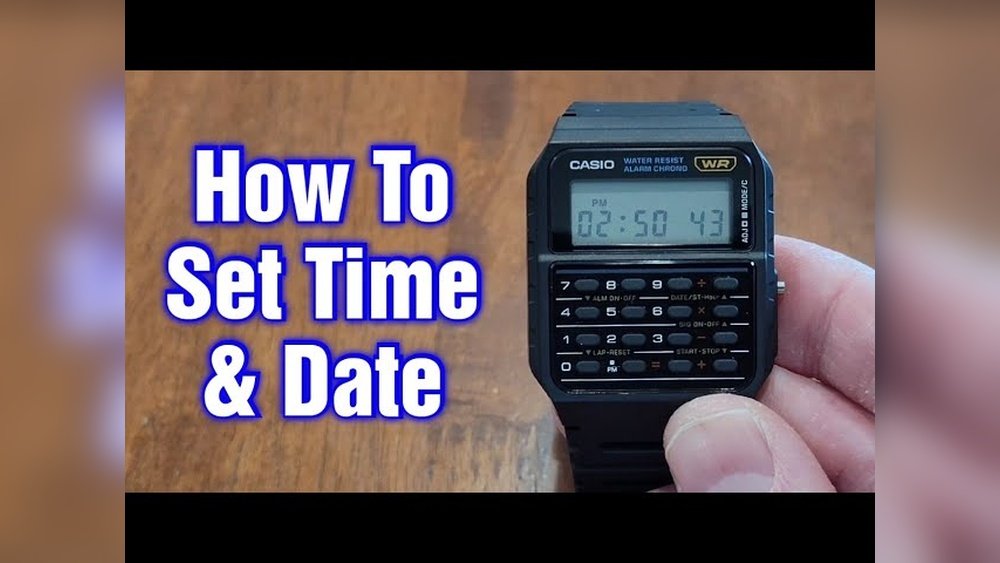
Setting up your Casio Databank watch might seem tricky at first, but it doesn’t have to be. If you want to make the most of your watch’s features—like storing contacts, setting alarms, or adjusting the time—you’re in the right place.
This guide will walk you through each step clearly and simply, so you can get your watch ready quickly and easily. Keep reading, and you’ll be confident using your Casio Databank watch in no time.
Preparing Your Casio Databank Watch
First, identify your Casio Databank watch model. Different models have different features. Check the back of the watch or the manual for the model number. This helps to find the right instructions.
Gather simple tools like a small flathead screwdriver or a toothpick. These help press tiny buttons or reset the watch if needed.
Learn what each button does. Most watches have four buttons: top left, top right, bottom left, and bottom right. Each button controls different functions like setting time, entering data, or switching modes.

Credit: www.casio.com
Entering The Setting Mode
The Mode button is usually on the lower left side of the watch. Press it to cycle through different functions.
Keep pressing the Mode button until the watch shows the time setting screen. This screen usually blinks or changes to show it is ready to be set.
Use the top right and bottom right buttons to move between settings. You can change the hour, minutes, year, month, and day.
Adjusting Date And Time
Press the mode button until the year starts flashing. Use the adjust button to change the year. Press the mode button again to move to month, then day. Change each using the adjust button. Press mode to save and move on.
After setting the date, the hour will flash. Use the adjust button to set the hour. Press mode to switch to minutes. Change minutes the same way. Press mode to confirm the time.
To choose between 12-hour or 24-hour format, press the adjust button while the hour is flashing. The watch will switch between AM/PM and military time. Confirm by pressing mode again. Simple and quick.
Setting Additional Features
Programming alarms on a Casio Databank watch is simple. Press the Mode button until the alarm screen appears. Use the Adjust button to set the hour and minute. Press Mode to move between hour and minute settings. Confirm by pressing Adjust. The alarm will beep at the set time.
Using the stopwatch is easy. Press Mode until the stopwatch screen shows. Start and stop the timer with the Start/Stop button. Reset it by pressing the Reset button. The timer counts in seconds and splits.
To manage Data Bank entries, enter the Data Bank mode with the Mode button. Add new entries using the Adjust button. Use the buttons to change letters and numbers. Save the entry by pressing Adjust again. Scroll through saved entries with the Search button. This keeps your contacts and info handy.
Saving And Exiting Settings
To confirm your changes, press the “Adjust” button once you finish setting. This saves all your new settings. Watch will beep to show the save is done.
To exit setting mode, press the “Mode” button. This takes you back to the normal watch screen. Now, your watch runs with the new settings.
Check if the watch shows the correct time and date. Look at the display carefully. Make sure all changes you made are shown correctly.

Credit: www.casio.com
Troubleshooting Common Issues
Watch Not Responding to Buttons: Press buttons firmly and hold for a second. Check if the watch is locked or in a special mode. Try removing and reinserting the battery if the problem continues.
Incorrect Date or Time Display: Make sure the watch is set to the right mode before changing time or date. Use the “Mode” button to cycle through settings. Adjust values using the “Adjust” button.
Resetting the Watch: Press and hold the reset button with a small tool for 5 seconds. This clears errors and sets the watch back to default. Remember to set your time and date again after reset.
Maintenance Tips For Accuracy
Battery replacement should be done by a professional. This keeps the watch safe and working well. Use only the correct battery type. Old batteries can cause damage or stop the watch.
Check the time on your watch regularly. Compare it with a reliable clock. This helps you notice if the watch runs too fast or slow.
Keep the watch away from water unless it is water-resistant. Avoid strong magnets and harsh chemicals. These can harm the watch’s parts and affect accuracy.
Store the watch in a cool, dry place when not worn. Clean it gently with a soft cloth. This removes dirt and keeps the watch looking good.

Credit: www.youtube.com
Frequently Asked Questions
How Do I Set The Time On My Casio Databank Watch?
Press the mode button until the time display appears. Hold the adjust button until the seconds blink. Use the buttons to change hours, minutes, and seconds. Press adjust again to save the settings.
How Can I Enter Data In Casio Databank Watch?
Press the mode button to reach the databank mode. Use the adjust button to start entering data. Use the navigation buttons to input letters and numbers. Confirm each entry with the adjust button.
How Do I Set The Date On Casio Databank Watch?
Enter the time setting mode by pressing mode and adjust buttons. Navigate to the date section using navigation buttons. Adjust the year, month, and day with the input buttons. Press adjust to save the date settings.
What Is The Best Way To Reset Casio Databank Watch?
Hold down the adjust button for a few seconds in any mode. This resets the seconds to zero. To fully reset, remove and reinsert the battery or follow specific model instructions.
Conclusion
Setting your Casio Databank watch is simple and quick. Follow the steps carefully to avoid mistakes. Take your time to adjust the time, date, and other settings. Practice makes perfect, so don’t worry if it takes a few tries. Once set, your watch will serve you well every day.
Enjoy the convenience of having accurate time and stored data on your wrist. Keep this guide handy for future reference. Stay confident in managing your watch settings yourself.