
Is your Casio Illuminator watch constantly beeping at the most inconvenient times? That annoying sound can disrupt your focus, meetings, or even your sleep.
But don’t worry—there’s a simple way to stop those beeps without losing any of your watch’s useful features. You’ll discover easy steps to silence your Casio Illuminator quickly, so you can enjoy peace whenever you want. Keep reading to regain control over your watch’s alerts and make it work for you, not against you.

Credit: www.reddit.com
Reasons For Casio Illuminator Beeping
The Casio Illuminator watch beeps for several reasons. Alarm and hourly signals cause the watch to beep at set times. You can turn off these alerts in the watch settings. Button tone activation means the watch beeps when you press buttons. This sound can be switched off if it bothers you. Low battery alerts also trigger beeping sounds. The watch warns you when the battery is running low. Replacing the battery stops these beeps. Knowing these causes helps you control the watch sounds easily. Adjust settings to stop unwanted beeping. Keep your watch working well and silent when needed.

Credit: www.youtube.com
Disabling Alarm And Hourly Beeps
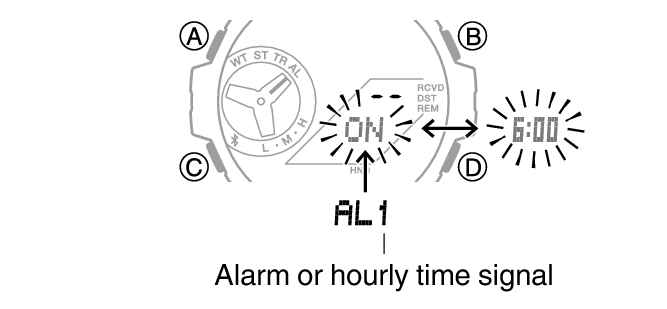
Turning off the alarm on a Casio Illuminator watch is simple. First, press the Mode button until you reach the alarm screen. Next, press the Adjust button to enter alarm setting. Use the Start/Stop or Split/Reset buttons to toggle the alarm on or off. When the alarm symbol disappears, the alarm is off.
Stopping hourly time signals also requires the Mode button. Reach the hourly time signal screen by pressing Mode repeatedly. Press the Adjust button until the signal icon blinks. Use the Start/Stop or Split/Reset buttons to turn the hourly beep off. No icon means the beep is disabled.
Turning Off Button Operation Tones
Press the Mode button on your Casio Illuminator watch. Hold it for a few seconds to enter the Settings Mode. Use the Adjust button to select different options.
To switch off the button beeps, navigate to the Button Tone setting. Use the Start/Stop or Split/Reset buttons to toggle the beep sound On or Off. Confirm your choice by pressing the Adjust button again.
After turning off the beep, press the Mode button to exit the settings. The watch will no longer beep when you press buttons. This helps to avoid noise in quiet places.
Resetting The Watch
To perform a soft reset on your Casio Illuminator watch, press and hold the Adjust button for about 3 seconds. The watch will beep, signaling it is ready to reset. Release the button, and the beeping should stop. This method clears minor glitches without erasing your settings.
A hard reset or restoring factory settings erases all saved data. To do this, press and hold the Mode and Adjust buttons together for 5 seconds. The display will flash, and the watch will beep to confirm. After this, the watch returns to its original settings, stopping any unwanted beeps caused by software issues.
Battery Check And Replacement
Signs of a low battery in a Casio Illuminator include frequent beeping and dim display. The watch may stop keeping time correctly or reset itself. These signs mean the battery needs to be changed soon.
Replacing the battery safely requires care. First, use a small screwdriver to open the back cover. Avoid touching the watch’s internal parts with bare hands to prevent damage. Use a new battery of the exact same type. Place it carefully in the battery slot. Close the back cover tightly to keep the watch water-resistant.
Preventing Future Beeping Issues
Keep the watch clean and dry. Dirt or moisture can cause beeping problems. Check the buttons often to make sure they are not stuck or dirty. Use a soft cloth to wipe the watch regularly. Avoid pressing buttons too hard or too fast. This helps stop accidental beeps.
Set alarms and timers only when needed. Turn off alerts after use. Avoid changing settings quickly to prevent errors. Store the watch in a safe place when not worn. This protects it from damage and keeps it working well.
Credit: support.casio.com
Frequently Asked Questions
How Do I Stop My Casio Illuminator From Beeping?
To stop the beeping, enter the watch’s settings menu. Navigate to the “Button Tone” option and turn it off. This disables all button press sounds instantly.
Can I Mute Only Specific Alerts On Casio Illuminator?
Yes, you can mute the hourly signal separately. Access the alarm settings and turn off the hourly chime without affecting other alerts.
Why Does My Casio Illuminator Beep Randomly?
Random beeping usually signals an active alarm or timer. Check your alarm and timer settings to identify and disable unwanted alerts.
Does Disabling Beep Affect Alarm Functions?
No, turning off button tones does not disable alarms. Your alarm and timer will still sound as scheduled.
Conclusion
Stopping your Casio Illuminator from beeping is simple and quick. Just follow the steps carefully. You can turn off the beep sound without any trouble. This helps you enjoy your watch without distractions. Remember, your watch settings can be changed anytime.
Feel free to adjust them to suit your needs. Now, your Casio watch will work quietly and smoothly. No more unwanted sounds bothering you. Keep your watch settings just the way you like them.