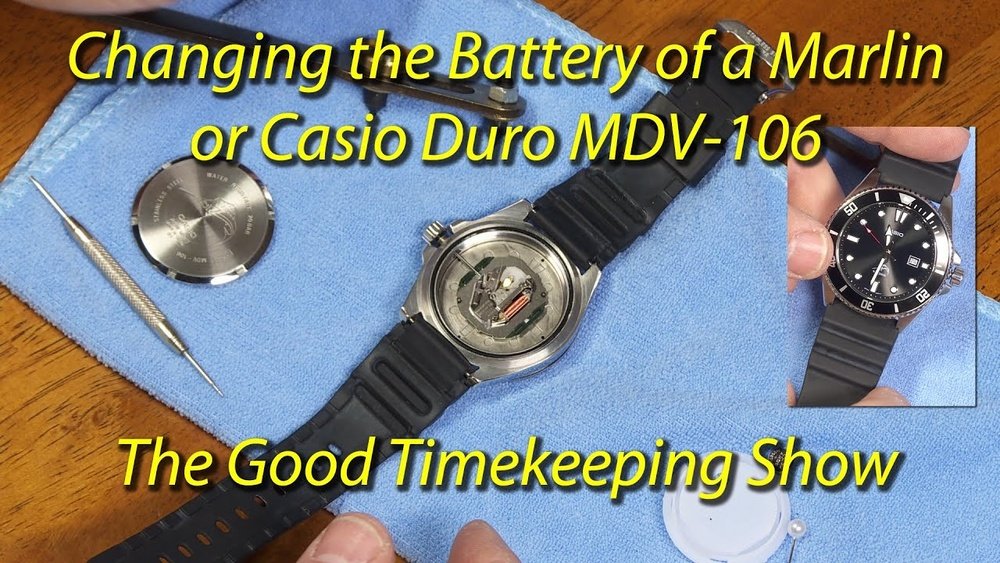
Is your Casio Duro watch running slow or stopped altogether? It might be time to change the battery.
You don’t have to spend money or wait days at a repair shop. With a few simple steps, you can replace your watch battery yourself and get your Casio Duro ticking perfectly again. This guide will show you exactly how to do it, saving you time and hassle.
Keep reading, and you’ll be surprised at how easy it is to bring your watch back to life.

Credit: www.joshualowcock.com
Tools Needed
To change the battery on a Casio Duro, gather these basic tools: a small Phillips screwdriver, a pair of tweezers, and a new CR2016 battery. A clean, flat surface helps keep small parts safe. Use a soft cloth to avoid scratches. A magnifying glass may assist with tiny screws. Keep a small container nearby for screws so they don’t get lost. These tools make the battery change quick and easy.
Preparing Your Workspace
Choose a clean, flat surface to work on. This helps keep small parts safe. Gather all tools before starting: a small screwdriver, tweezers, and a new battery. Good lighting is important. Use a bright lamp or work near a window. Lay down a soft cloth to stop scratches on the watch. Keep the watch steady to avoid slips. Organize parts in order as you remove them. This makes reassembly easier and faster. Avoid dust and moisture in your workspace. Wash your hands to prevent dirt and oils on the watch. Taking these steps helps make the battery change smooth and safe.
Removing The Watch Back
Start by placing the watch face down on a soft cloth. This protects the glass from scratches. Use a small screwdriver or a watch case opener tool. Gently pry open the back cover. Some Casio Duro models have screws; remove them carefully. Keep screws safe to avoid losing them. If the back is tightly sealed, apply gentle pressure. Do not force it open to avoid damage. Once the back is off, you can see the battery inside. Make sure to work in a clean, well-lit area. This helps avoid losing small parts.
Taking Out The Old Battery
Start by turning the watch face down on a soft cloth. This prevents scratches on the glass. Use a small screwdriver to remove the back cover screws carefully. Keep the screws safe; they are tiny and easy to lose.
Once the back cover is off, locate the battery inside. It usually sits under a small metal clip or holder. Gently lift the clip with a tool or your fingernail to free the battery.
Remove the old battery by sliding it out carefully. Avoid touching other parts inside the watch. Old batteries may leak and damage the watch, so handle with care.
Choosing The Right Replacement Battery
Choosing the right battery for your Casio Duro is very important. The watch uses a specific type called CR2016 lithium battery. This battery is small and lasts a long time. Using the wrong battery can cause damage or poor performance.
Check the watch manual or the back cover for battery type information. Buy from a trusted store to avoid fake batteries. A good battery keeps the watch working well for years.
| Battery Type | Voltage | Size (Diameter x Height) | Common Use |
|---|---|---|---|
| CR2016 | 3V | 20mm x 1.6mm | Watches, small devices |
Installing The New Battery
Start by placing the new battery in the same spot as the old one. Make sure the battery’s positive side faces up. Gently press it down so it fits snugly. Avoid using too much force to prevent damage.
Next, check if the battery is secure. The watch should have a small clip or holder to keep the battery in place. Reattach this clip carefully if needed. This helps the battery stay steady.
Before closing the watch back, test if the watch is working. The screen or hands should move as usual. If it doesn’t, try repositioning the battery.
Finally, screw or snap the back cover on tightly. This protects the inside of the watch from dust and water. Be sure the cover is aligned correctly to avoid gaps.
Sealing The Watch Back
After placing the new battery, the watch back must be sealed tightly. A proper seal stops water and dust from entering. Use a clean cloth to wipe the edges before closing. Align the watch back correctly with the case. Press down evenly to avoid bending or damage. Some Casio Duro models require a special tool for pressing the back on. Avoid using excessive force to prevent cracking the glass or case. Check the seal by gently pressing around the edges. If it moves or feels loose, reseal it carefully. A well-sealed back keeps the watch working longer and safe from moisture.
Testing The Watch Functionality
After replacing the battery, check if the watch is working properly. Look at the digital display and hands. Make sure the numbers and time move as usual. Press the buttons to see if they respond.
Set the time and date. Watch if the second hand ticks smoothly. If it stops or jumps, the battery may not be placed correctly.
Test the backlight by pressing the light button. It should turn on brightly. Also, check the alarm and other features to confirm they work well.
Wear the watch for a few minutes. Notice if the time stays accurate. This helps ensure everything is fine before sealing the back cover.
Tips For Battery Care
Keep the battery contacts clean to ensure good power flow. Use a soft cloth to wipe dirt or dust. Avoid touching the battery with bare hands to prevent oil buildup.
Store your Casio Duro watch in a cool, dry place. Extreme heat or cold can shorten battery life. Remove the watch if you won’t use it for a long time.
Replace the battery as soon as the watch starts to lose time. A weak battery can cause damage to the watch’s internal parts. Using the right battery type is very important for proper function.

Credit: www.reddit.com
When To Seek Professional Help
Seek professional help if the watch case is hard to open. Some Casio Duro models have tight seals to keep water out.
Damaging the seal can cause water damage later. Also, if you lack tools like a small screwdriver or tweezers, a professional can help safely.
Watch for signs like battery leaks or corrosion inside the watch. These need expert care to avoid more damage.
When the watch does not work after battery replacement, a technician can check for other problems.
Lastly, if you want to keep the watch’s water resistance, experts have the right tools to reseal it properly.

Credit: www.youtube.com
Frequently Asked Questions
How Do I Open The Casio Duro Back Cover?
Use a small screwdriver to carefully unscrew the back cover. Turn screws counterclockwise. Lift the cover gently to avoid damage.
What Type Of Battery Does Casio Duro Use?
Casio Duro typically uses a CR2016 lithium coin battery. Always check your specific model for exact battery type.
How Can I Safely Remove The Old Battery?
Use plastic tweezers or a non-metal tool. Avoid metal tools to prevent short circuits or damage.
Do I Need Special Tools To Change The Battery?
Basic tools like a small screwdriver and plastic tweezers are sufficient. No special tools are required.
Conclusion
Changing the battery on your Casio Duro is simple and quick. Just follow the steps carefully to avoid any damage. Use the right tools to open the back cover safely. Replace the old battery with a new one that fits perfectly.
After closing the watch, check if it works well. Regular battery changes keep your watch running smoothly. Now, you can enjoy your Casio Duro without any worry about power. Taking care of your watch this way saves money on repairs.
Easy and effective.