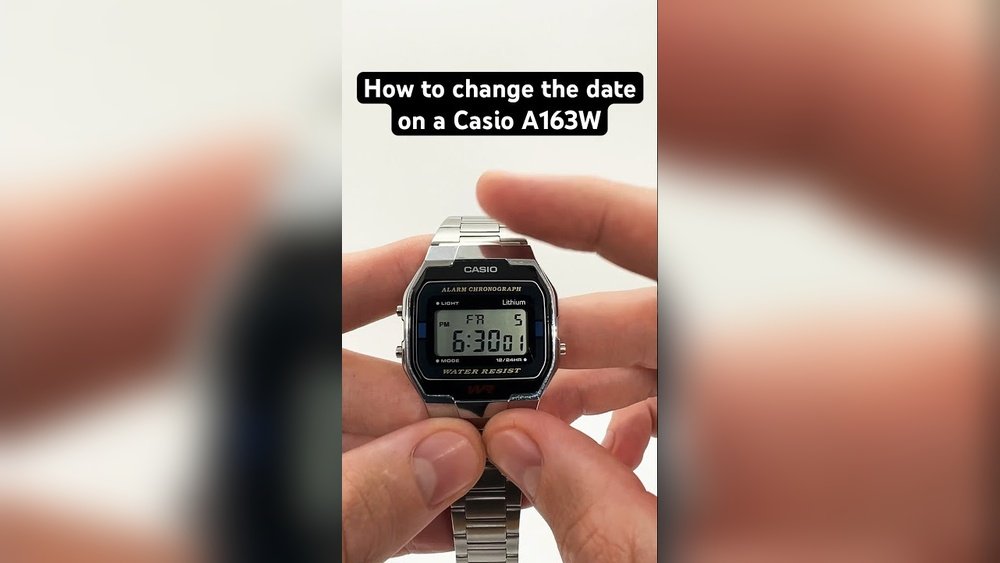
Casio watches are popular for their durability and style. Many people use them every day. Sometimes, you need to change the date on your watch. It can be confusing if you do not know how. This guide will help you change the date easily. We will cover analog and digital Casio watches.
Why Change the Date?
Your watch shows the date to help you keep track of days. Sometimes, the date is wrong. This happens after a long month or if the watch stopped. Changing the date keeps your watch correct. It is simple when you follow the steps.
Changing Date on Analog Casio Watch
Analog watches have small hands and a knob called the crown. The crown is on the side of the watch. Here is how to change the date on analog Casio watches:
- Find the Crown: Look on the right side of your watch. You will see a small knob.
- Pull the Crown Out: Pull the crown gently until you feel one click. Do not pull it too far.
- Turn the Crown: Rotate the crown slowly. Watch the date number change. Turn until you reach the correct date.
- Push the Crown Back: After setting the date, push the crown back to its normal position.
Be careful not to pull the crown out two clicks. That changes the time, not the date. Also, do not force the crown if it feels stuck.
Tips For Analog Watches
- Change the date when the time is not between 9 PM and 3 AM. This prevents damage.
- If the date does not change, check if the watch is working properly.
- Turn the crown slowly to avoid breaking the mechanism.
Changing Date on Digital Casio Watch
Digital Casio watches show the date on a screen. They have buttons instead of a crown. Follow these easy steps to change the date:
- Press the Mode Button: The mode button is usually on the bottom left. Press it until the seconds flash on the screen.
- Navigate to Date Settings: Press the light button (top left) or the mode button again. Stop when the month or day flashes.
- Change the Date: Use the button on the right side (often called the adjust or set button). Press it to increase the number.
- Move Between Date Parts: Use the light or mode button to switch between month, day, and year.
- Exit Setting Mode: Press the mode button until the watch returns to normal time display.
Each digital model may have small differences. Check your watch manual if you have trouble. The process is very similar for most Casio digital watches.
Quick Guide For Digital Watches
| Step | Action |
|---|---|
| 1 | Press Mode button until seconds flash |
| 2 | Use Light button to select month/day |
| 3 | Press Adjust button to change date |
| 4 | Press Mode to finish setting |
Changing Date on Casio G-Shock Watches
G-Shock watches are tough and sporty. They have more features but changing the date is similar. Here is how:
- Press the Mode button (bottom left) several times. Stop when the date or seconds flash.
- Use the buttons on the right side to change the date number.
- Move between month, day, and year by pressing the Mode or Light button.
- Press Mode button to exit setting mode.
G-Shock watches may have extra buttons. But the main idea is the same: enter setting mode, select date, adjust, and exit.

Credit: www.wikihow.com

Credit: www.youtube.com
Important Tips for All Casio Watches
- Do not change the date between 9 PM and 3 AM. The watch may be changing the date automatically.
- Be gentle with buttons and crown. Do not force them.
- If your watch has a manual, read it. Different models may have small changes.
- If your watch stopped working, replace the battery before setting the date.
Summary
Changing the date on your Casio watch is simple. For analog watches, pull the crown one click. Turn it to change the date. Push the crown back in.
For digital watches, press Mode to enter setting. Use buttons to select and change the date. Press Mode to save and exit.
Remember to avoid changing the date late at night. Follow the steps slowly and carefully.
Now, you can keep your Casio watch up to date. You will always know the right date. No more confusion or mistakes.
Frequently Asked Questions
How Do I Adjust The Date On My Casio Watch?
Pull the crown out to the first click on analog models. Rotate it to set the date. Push crown back in. For digital watches, press the mode button until the date flashes, then use side buttons to adjust. Press mode again to confirm.
How To Set Time On Casio With 3 Buttons?
Press the Mode button three times until seconds flash. Use Light button to select hour, minute, or date. Press Set button to adjust. Press Mode to save and exit.
How Do I Change The Date Of My Watch?
Pull the crown out to the first click. Rotate it clockwise or counterclockwise to set the date. Push the crown back in. For digital watches, press the mode button until the date flashes, then use the right-side buttons to adjust.
Press mode to save.
How To Set Date On Casio Watch With One Button?
Pull the crown out to the first click. Rotate it to adjust the date. Push the crown back in to save.