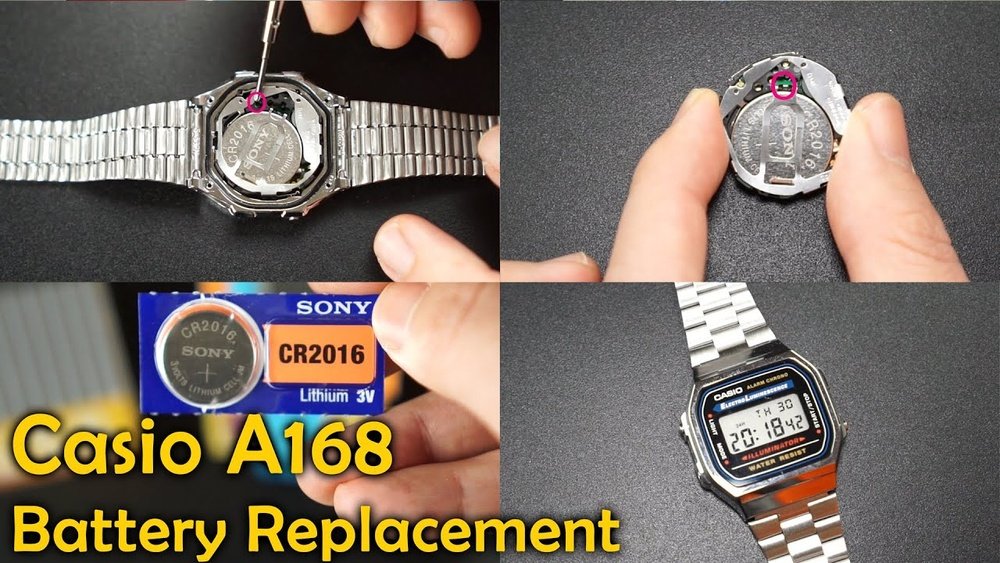
Is your Casio watch running slow or stopped ticking altogether? You might be wondering if you can replace the battery yourself without spending extra money or waiting for a professional.
The good news is, in many cases, you absolutely can. But before you open the back of your watch, there are important things you need to know to avoid damaging it. Keep reading to discover simple steps, helpful tips, and what tools you’ll need to bring your Casio watch back to life quickly and safely.
Your timepiece deserves the best care—and you’re just a few minutes away from making that happen.
Signs Your Casio Watch Needs A New Battery
Common battery problems include the watch stopping suddenly or the display fading. If the watch’s light dims or stops working, the battery may be low. Some Casio watches show incorrect time or reset often, which can mean the battery is weak.
How to check battery life: Observe if the watch’s buttons respond slowly or not at all. A watch that loses time quickly usually needs a new battery. Testing with a battery tester or taking it to a repair shop can confirm battery health. Regular battery changes help keep your Casio watch working well.
Credit: www.ifixit.com
Tools Required For Battery Replacement
To replace a Casio watch battery, some basic tools are needed. A small precision screwdriver helps open the watch back. Tweezers are useful to handle the tiny battery safely. A plastic pry tool can lift the battery without damage.
Replacement batteries fit specific Casio models. Check the watch manual or look on the old battery for the code. A clean workspace with good light makes the task easier and safer.
| Essential Tools | Where to Buy |
|---|---|
| Precision screwdriver set | Hardware stores, online shops |
| Tweezers (plastic or metal) | Watch repair kits, online |
| Plastic pry tool | Electronics stores, Amazon |
| Replacement battery | Watch stores, online retailers |
Preparing Your Workspace
Choose a clean and flat surface to work on. A well-lit area helps you see small parts clearly. Avoid dusty or humid places. These can damage the watch or battery.
Keep a small tray or container nearby. It holds tiny screws and parts safely. Use a soft cloth to protect the watch face from scratches.
| Safety Tips |
|---|
| Turn off the watch before starting. |
| Use tools made for small electronics. |
| Avoid touching the battery with bare hands. Use gloves or a tissue. |
| Do not force any parts to open. |
| Keep children and pets away from your workspace. |
Step-by-step Battery Replacement Process
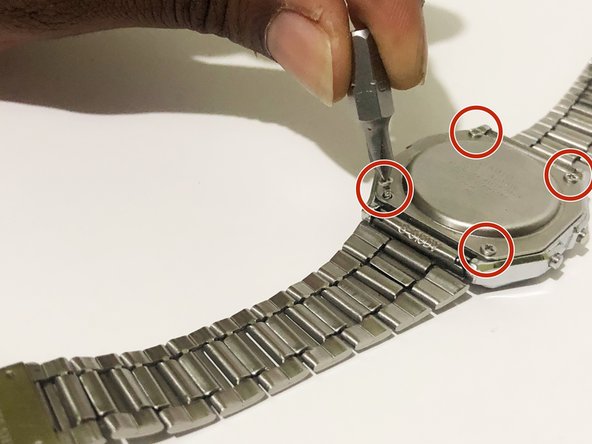
First, find a clean, flat surface to work on. Use a small screwdriver or a watch case opener to gently pry open the watch back. Be careful not to scratch or damage the watch. Some Casio watches have screws, so remove them carefully.
Next, look for the battery inside. Use tweezers or a small tool to lift out the old battery. Note the battery type and size before removing it. Avoid touching other parts inside the watch.
Place the new battery in the same position as the old one. Make sure it fits snugly and the plus (+) side is facing up. Press it gently into place without forcing it.
Finally, put the watch back cover on. Press it down firmly until it clicks or screw it back in. Check if the watch is working before finishing. Done!
Testing Your Watch After Battery Change
After replacing the battery, check if the watch powers on immediately. The display should light up or the hands should move. Set the time and date to ensure the buttons respond correctly.
Check all functions like alarm, stopwatch, and backlight. Press each button to see if it works smoothly. The watch should keep accurate time for at least a few minutes.
If the watch does not start, double-check the battery placement. Make sure the battery is installed with the correct side up. Clean any dust or dirt from the battery contacts to improve connection.
Sometimes, the watch may reset unexpectedly. This can happen if the battery is loose or not fitting well. Try pressing the buttons firmly and observe any delay or unresponsiveness.
| Common Issue | Possible Cause | Quick Fix |
|---|---|---|
| Watch does not start | Battery inserted wrong or dead | Reinstall battery, try a new one |
| Buttons unresponsive | Dirt or poor contact | Clean contacts gently |
| Time resets frequently | Loose battery or connection | Secure battery, press firmly |

Credit: www.watchbattery.co.uk
When To Seek Professional Help
Complex Casio watch models often have special parts. These parts need careful handling during battery replacement. Some watches have water resistance that can break if opened wrong. Professionals have the right tools to keep the watch safe.
Warranty rules also matter. Opening the watch yourself might void the warranty. This means the company may not fix or replace your watch for free. Letting a pro handle the battery change can keep the warranty valid. It also gives peace of mind.
Maintaining Your Casio Watch Battery
Keeping your Casio watch battery healthy means checking it regularly. Clean the watch gently to avoid dirt buildup. Dirt can cause the battery to drain faster. Avoid exposing the watch to extreme heat or cold. These conditions reduce battery life.
Turn off features you do not use, like alarms or backlights. This helps save battery power. Replace the battery as soon as it starts to run low. Waiting too long can damage the watch. Use only genuine Casio batteries for the best fit and performance.
Store the watch in a dry place when not in use. Moisture can harm the battery and watch parts. Regular care can keep your watch running smoothly for years.

Credit: jeffwerner.ca
Frequently Asked Questions
Can I Replace The Battery In My Casio Watch Myself?
Yes, you can replace the battery yourself with proper tools. Be careful to avoid damaging the watch’s internal parts. Follow a step-by-step guide or watch tutorial videos for best results.
How Often Should I Replace A Casio Watch Battery?
Typically, Casio watch batteries last 2 to 5 years. Battery life depends on the model and usage. Replace the battery as soon as the watch shows signs of slowing or stopping.
What Type Of Battery Does A Casio Watch Need?
Casio watches usually require silver oxide batteries like SR626SW or CR2016. Check your watch’s manual or back case for the exact battery type to ensure compatibility.
Is It Better To Get Casio Battery Replaced Professionally?
Professional replacement ensures correct battery type and proper sealing. It reduces the risk of damage and maintains water resistance. Consider professional service if unsure about DIY replacement.
Conclusion
Replacing the battery in a Casio watch is simple and doable. You need the right tools and a steady hand. Be careful not to damage small parts inside. A fresh battery brings your watch back to life. Save money by doing it yourself or visit a professional.
Either way, your Casio watch can keep ticking for years. Don’t let a dead battery stop your time. Take action, and enjoy your watch again.